
DVD Cover Template
Make a custom cover for a home movie, wedding video, school performance, band demo or backup disc. These templates print at actual size: a standard DVD case insert with front, spine and back panels, round disc labels, and CD jewel case booklet and tray card templates, each with trim and safe-area guides. Design in any app using the Word template or the measurements below, or print the guides and draw by hand.
- Instant download
- Editable Word & Excel
- Print-ready PDF
- 7-day refund
Quick answer
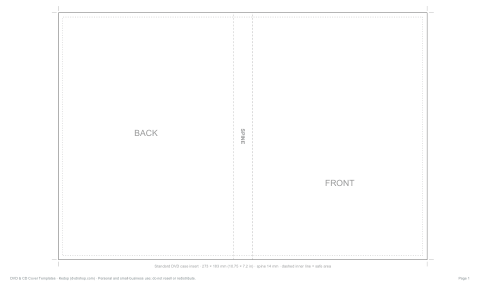
DVD cover template: a standard DVD case insert is 10.75 × 7.20 in (273 × 183 mm), with front, spine and back panels. That size fits on US Letter landscape and A4 landscape at 100% actual size, though printer margins or full-bleed artwork may make Legal, Tabloid or A3 easier.
7 files · PDF, DOCX, XLSX
DVD & CD Cover Templates
Actual-size printable templates: DVD case insert (front, spine, back), disc labels, CD jewel case booklet and tray card, with trim and safe-area guides, an editable Word insert and an Excel disc archive log.
- DVD case insert (PDF)
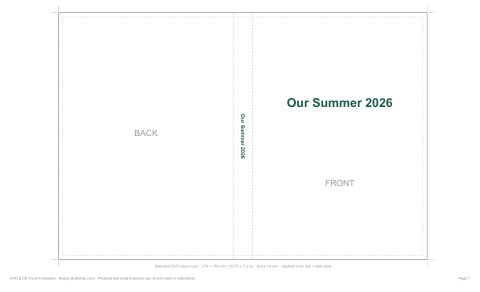
- Sample with title (PDF)
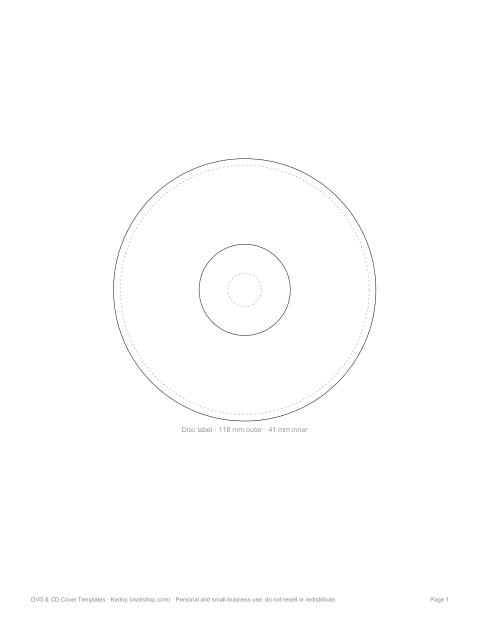
- Disc labels (PDF)
- + 4 more
$5.00 USD, one-time 7 files · about $0.71 each
- Instant download
- 7-day refund
- Secure checkout by Stripe
7-day money-back guarantee. Full refund within 7 days of purchase, even after you download.
Free sample: DVD Case Insert Template (PDF, 26 KB)
DVD & CD Cover Templates
Actual-size printable templates: DVD case insert (front, spine, back), disc labels, CD jewel case booklet and tray card, with trim and safe-area guides, an editable Word insert and an Excel disc archive log.
- DVD case insert (PDF)
- Sample with title (PDF)
- Disc labels (PDF)
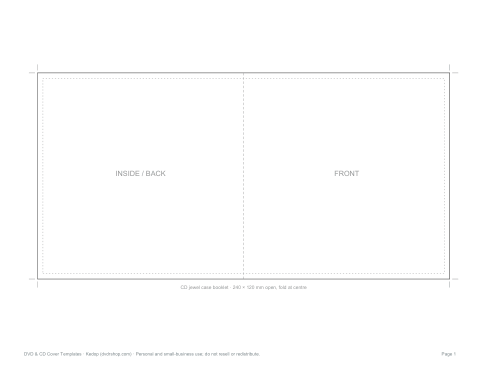
- CD booklet (PDF)
- CD tray card (PDF)
- Editable DVD insert (DOCX)
- Archive log (XLSX)
Formats: PDF, DOCX, XLSX. Instant download after payment (link valid 72 hours, up to 5 downloads). AI-assisted: the templates were drafted with AI help and reviewed and laid out before publishing.
$5.00 USD, one-time 7 files · about $0.71 each
- Instant download
- 7-day refund
- Secure checkout by Stripe
7-day money-back guarantee. Full refund within 7 days of purchase, even after you download.
Free sample: DVD Case Insert Template (PDF, 26 KB)
Full refund within 7 days — see the refund policy and license.
Free printables
Single sheets you can print right now, no sign-up. The full pack adds every sheet in one download plus the editable files.
 Printable DVD Case Insert
 Printable DVD Cover Template
 Printable DVD Disc Labels
 Printable DVD Booklet Cover
 Printable DVD Tray Card PDF
 Printable Disc Archive Log
DVD cover and label sizes
Use these common sizes when choosing or printing a DVD cover template.
| Item | Size | US paper fit | Notes |
|---|---|---|---|
| Standard DVD insert | 10.75 × 7.20 in (273 × 183 mm) | Letter landscape | 14 mm spine |
| Slim DVD insert | About 10.47 × 7.20 in (266 × 183 mm) | Letter landscape | 7 mm spine typical |
| DVD/CD disc label | 118 mm outer, 41 mm inner | Letter | Printable area varies |
| CD booklet open | 9.45 × 4.72 in (240 × 120 mm) | Letter | Folds to 120 × 120 mm |
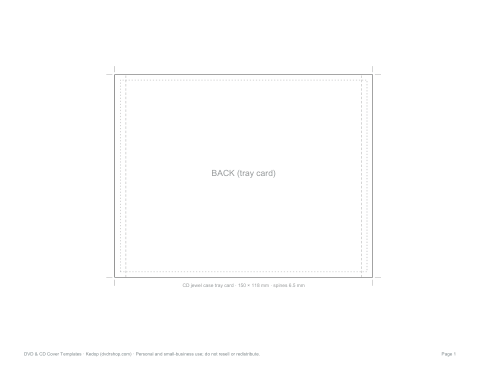
| CD tray card | 5.91 × 4.65 in (150 × 118 mm) | Letter | Includes two spines |
| With 3 mm bleed | 279 × 189 mm | Tight on Letter | A4 or larger is easier |
DVD and CD cover sizes
| Item | Size | Notes |
|---|---|---|
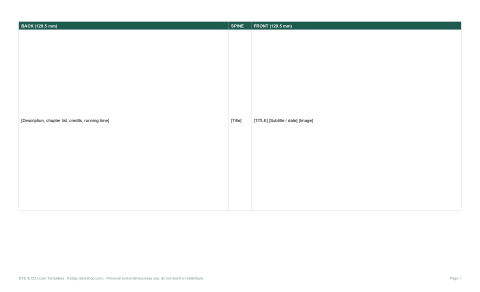
| DVD case insert (standard 14 mm case) | 273 × 183 mm (10.75 × 7.2 in) | Back 129.5 mm · spine 14 mm · front 129.5 mm |
| Slim DVD case insert (7 mm) | About 266 × 183 mm | Spine about 7 mm |
| DVD / CD disc label | 118 mm outer, 41 mm inner (hub) | Printable discs vary; check your disc |
| CD jewel case booklet | 240 × 120 mm open (120 × 120 mm folded) | Front and inside |
| CD jewel case tray card | 150 × 118 mm | Includes two 6.5 mm spines |
Measure your case before printing: sizes vary slightly between manufacturers.
Understanding bleed, trim and safe area
- Trim line — the solid outline, where you cut.
- Bleed — if your design has colour to the edge, extend the background about 3 mm (⅛ in) past the trim line so no white slivers appear after cutting.
- Safe area — the dashed inner line, about 3 mm inside the trim; keep text and important images inside it.
- Spine — the narrow strip between front and back; keep spine text short and centred, reading top to bottom (the common convention in North America and the UK).
Printing the DVD insert
- The insert is wider than US Letter, so the template is set up on US Legal paper (8.5 × 14 in) in landscape; A4 landscape is too short for the full 273 mm width, but A3 or Tabloid also work.
- Print at 100% / “Actual size”, not “Fit to page”.
- Use matte or glossy photo paper or thin card (up to about 200 gsm) — thicker card will not slide into the clear sleeve.
- Cut along the trim lines with a paper trimmer or craft knife and ruler.
- Slide the insert under the clear sleeve of the case, front panel on the right when the case opens like a book.
Designing your cover
- Front — title in large, readable type; one strong image; a subtitle or date.
- Spine — title and year, so the disc is easy to find on a shelf.
- Back — a short description, a few still images, a scene or track list, running time and credits.
- Disc — title, date and a simple graphic; avoid heavy ink near the hub.
Use images at 300 dpi at print size — a full-bleed front panel needs about 1,530 × 2,160 pixels. Photos from phones usually have enough resolution; screenshots from video may look soft.
Disc labels
For printable discs (with a white printable surface), some inkjet printers print directly onto the disc using a tray. Otherwise use adhesive disc labels, applying them with a centring tool so the disc stays balanced. Paper labels that are off-centre or peeling can cause playback problems in some drives, so for archival discs many people prefer to write on the disc with a disc-safe marker and keep the design on the case insert.
Worked example: a wedding video
A couple sets the front panel to a favourite portrait with their names and date inside the safe area, and a white “Our Wedding · 14.06.2027” spine. The back lists the chapters — ceremony, speeches, first dance — over a soft photo, with the videographer’s name at the bottom. They print on legal-size matte photo paper at actual size, trim, and slide it into a standard 14 mm DVD case, then print a matching disc label.
Copyright
Make covers for your own videos, recordings and backups. Reproducing commercial film or album artwork for distribution may infringe copyright and trademarks.
Formats
Print-ready PDF templates at actual size (DVD insert on US Legal landscape; disc labels and CD templates on US Letter), an editable Word DVD insert, and a disc archive log in Excel.
Frequently asked questions
Can I use this as a DVD cover maker?
Yes. Edit the Word template or use the measurements to build your cover in another design app, then print at 100% actual size.
Can I print a DVD cover on US Letter paper?
Yes, the standard 10.75 × 7.20 in insert fits on Letter paper in landscape orientation. If your printer clips the edges or you add bleed, use borderless printing or a larger sheet.
Is a DVD sleeve template the same as a DVD cover template?
Searchers often use the terms interchangeably, but a case insert slides under a plastic case sleeve. A paper disc sleeve or envelope uses different dimensions.
What size is a DVD cover?
A standard insert is about 273 × 183 mm (10.75 × 7.2 in), including a 14 mm spine.
Can I print a DVD cover on Letter paper?
Not at full size; use Legal, Tabloid or A3 paper, or print at actual size on Legal as provided.
What paper should I use?
Photo paper or thin card up to about 200 gsm so it fits under the sleeve.
What is the bleed?
Extra background (about 3 mm) beyond the trim line so there are no white edges after cutting.
Was AI used to create the templates?
The templates were generated by script and the text drafted with AI assistance, then reviewed before publishing.